
Text Styling#
Balatro includes a very basic formatting syntax for styling and formatting displayed text in-game. Where supported, text can be styled with the use of style modifier codes included within the text string. For example, the text string:
{C:blue}+1{} hand
|
produces
|

|
Most SMODS objects that display description text will parse and style text strings automatically when loading from localization files or loc_txt. This includes the text strings of descriptions for Achievements, Consumables, Decks, Jokers, Vouchers, and more.
Style modifiers are not additive - text will only be styled by the modifiers contained within the previous set of curly braces. Using empty braces {} will reset text styling for text after it.
Additionally, multiple modifiers can be combined in a single set of curly braces. For example, the text string:
{X:mult,C:white}X0.5{}
|
produces
|

|
Valid style modifiers are as follows:
| Text colour |
{C:colour}/{V:colour}
|
| Background colour |
{X:colour}/{B:colour}
|
| Text motion |
{E:motion-index}
|
| Text hover tooltip |
{T:tooltip-key}
|
| Text scale |
{s:scale}
|
| Text underline |
{u:colour}
|
| Text strikethrough |
{st:colour}
|
| Text overline |
{ov:colour}
|
| Text outline |
{O:colour}
|
| Font |
{f:font}
|
| Button |
{button:function-key}
|
| UI Element |
{element:element-index}
|
| No modifiers (use default styling) |
{}
|
Important
Modifiers are case sensitive - make sure to refer to this list for the appropriate capitalization.
Text colour modifiers {C:}/{V:}#
{C:colour} or {V:colour} changes the color of the text, where colour is one of the following:
the key of a colour defined in
G.ARGS.LOC_COLOURS,a 6-digit RGB hex code or an 8-digit RGBA hex code, or
the index of a custom colour provided as an entry in the
loc_varsvars.colourstable. See Localization for more details.
Note
This functionality was added by Steamodded in 26.829.0. In older versions and in vanilla Balatro, {C:} only supports the first option, and {V:} only supports the third option.
Examples#
| Text string | loc_vars | Result |
{C:mult}+4{} Mult
|

|
|
{C:attention}1{} free {V:green}Reroll{}
|

|
|
{C:green}#1# іn #2#{} chance
|
vars = {
  G.GAME.probabilities.normal, -- 1
  card.ability.extra.odds      -- 6
}
|

|
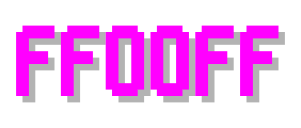
{C:ff00ff}FF00FF{}
|
|
|
{V:2}#2#{} suit{}
|
vars = {
  'Spade',
  'Heart',
  'Club',
  'Diamond',
  colours = {
    G.C.SUITS.Spades,
    G.C.SUITS.Hearts,
    G.C.SUITS.Clubs,
    G.C.SUITS.Diamonds
  }
}
|

|
Background colour modifiers {X:}/{B:}#
{X:colour} or {B:colour} sets the background color of the text, where colour is one of the following:
the key of a colour defined in
G.ARGS.LOC_COLOURS,a 6-digit RGB hex code or an 8-digit RGBA hex code, or
the index of a custom colour provided as an entry in the
loc_varsvars.colourstable. See Localization for more details.
Note
This functionality was added by Steamodded in 26.829.0. In older versions and in vanilla Balatro, {X:} only supports the first option. {B:} is not supported by vanilla Balatro; in older Steamodded versions, it only supports the third option.
These modifiers are usually combined with a text colour modifier to make 
The {X:} modifier uniquely strips all whitespace from the styled text, so text like {X:gold} W I D E {} is rendered as  . This can be helpful for improving the readability of otherwise dense strings. The
 {B:} modifier instead leaves the styled text’s whitespace unmodified.
Examples#
| Text string | loc_vars | Result |
{B:mult,C:white}X3{} Mult{}
|

|
|
{X:chips,C:white} X 1 . 5 {} Chips{}
|

|
|
{X:mult,C:white} X#1# {}
|
vars = {
  card.ability.extra.xmult -- 0.5
}
|
|
{B:00ff00}00FF00{}
|

|
|
{B:1,V:2}Oh no!{} Anyway...
|
vars = {
  colours = {
    {1, 0, 0, 1}, --#FF0000
    {0, 0, 0, 1}  --#000000
  }
}
|

|
{B:1,V:2}#1#{B:2,C:1}#2#{}
|
vars = {
  'Spa',
  'rts',
  colours = {
    G.C.SUITS.Spades,
    G.C.SUITS.Hearts,
  }
}
|

|
Text motion modifier {E:}#
{E:1} applies a pop-in effect when the text is first displayed, and a floating animation to each letter in the text.
{E:2} applies a bumping animation to each letter in sequence.
{E:} is fully compatible with background modifiers {X:} and {B:} (Added by Steamodded). In vanilla Balatro, if background modifiers are set, {E:1} will only show a pop-in effect with no motion, and {E:2} will be ignored.
You can also apply a custom effect using SMODS.DynaTextEffect, in that case the modifier should be {E:modprefix_key}.
Examples#
| Text string | Result |
{C:green,E:1}probabilities{}
|

|
{E:2}Joker{}
|

|
{C:red,E:2}self destructs{}
|

|
Text hover tooltip modifier {T:}#
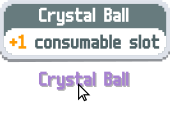
{T:tooltip-key} adds tooltip functionality to the text, which displays a small tooltip UI above the text when the text is hovered over. If tooltip-key can be the name of a key found in either G.P_CENTERS or G.P_TAGS or a description found in G.localization.descriptions.Other (Added in 1814a). In the latter case, you can supply additional information as follows: {T:[key=tooltip-key;set=set-key;1=var1;2=var2;…]} (Added in 26.829.0). The set-key is used to specify a set in G.localization.descriptions to pull from, and the variables var1, var2, etc. are used to supply any localization variables in the text.
Note
The same effect can be achieved using {T:tooltip-key,T_set:set-key,T_vars=var1;var2;…} (added in 1814a).
Examples#
| Text string | Result |
{C:tarot,T:v_crystal_ball}Crystal Ball{}
|
|
"Shop can have {C:perishable,T:[key=perishable;1=5;2=5]}Perishable{} Jokers"
|
TBD |
"{T:[key=bl_arm;set=Blind]}The Arm{}"
|
TBD |
Text scale modifier {s:}#
[!IMPORTANT] This modifier requires the lowercase
s, unlike other modifiers which must be UPPERCASE.
{s:scale} changes the size of the text.
scale is a decimal value where the default size is 1.0.
Vanilla Balatro only uses s:0.8, s:0.85 and s:1.1 text scales.
Examples#
| Text string | Result |
{s:0.8}0.8 {s:1.0}1.0 {s:1.1}1.1{}
|

|
Text underline, strikethrough and overline modifiers {u:}/{st:}/{ov:}#
[!NOTE] These modifiers are added by Steamodded and are not supported by vanilla Balatro. (Added in 26.829.0)
Important
These modifiers must be lowercase, unlike other modifiers which must be UPPERCASE.
Basic usage#
{u:colour}, {st:colour} and {ov:colour} respectively add an underline, strikethrough, or underline to the text. The width of the line is 10% of the text’s height.
colour sets the colour of the line, where colour is one of the following:
the key of a colour defined in
G.ARGS.LOC_COLOURS,a 6-digit RGB hex code or an 8-digit RGBA hex code, or
the index of a custom colour provided as an entry in the
loc_varsvars.colourstable. See Localization for more details.
Advanced usage#
By supplying a table to the text modifier, it is possible to customize the lines further: {u:[c=colour;s=size]}. size is a decimal value with a default of 0.1. It indicates the thickness of the line relative to the height of the text. It is required to specify a colour.
Examples#
| Text string | Result |
{u:red}Underlined text!
|
TBD |
{st:[c=green;s=0.2]}Thick strikethrough text!
|
TBD |
{ov:[c=blue;s=0.05]}Thin overlined text!
|
TBD |
Text outline modifier {O:}#
[!NOTE] This modifier is added by Steamodded and is not supported by vanilla Balatro. (Added in 26.829.0)
Basic usage#
{O:colour} adds an outline to the text.
colour sets the colour of the line, where colour is one of the following:
the key of a colour defined in
G.ARGS.LOC_COLOURS,a 6-digit RGB hex code or an 8-digit RGBA hex code, or
the index of a custom colour provided as an entry in the
loc_varsvars.colourstable. See Localization for more details.
Advanced usage#
By supplying a table to the text modifier, it is possible to customize the outline further: {O:[c=colour;s=size]}. size is a decimal value with a default of 1.0. It indicates the thickness of the outline. Due to implementation constraints, large size values may lead to unexpected results. It is required to specify a colour.
Examples#
| Text string | Result |
{O:red}Outlined text!
|
TBD |
{C:blue,O:[c=green;s=0.6]}Thinner outline!
|
TBD |
Text font modifier {f:}#
[!NOTE] This modifier is added by Steamodded and is not supported by vanilla Balatro.
Important
This modifier requires the lowercase f, unlike other modifiers which must be UPPERCASE.
{f:font} changes the font of the text.
font is a f value ranging from 1 to 9 in vanilla, to add custom fonts you need to set the value as the font’s full key (modname_font).
Examples#
| Text string | Font Name | Assigned Language | Result |
{f:1}Hello{}
|
m6x11 plus | Default |

|
{f:2}Hello, 你好{}
|
Noto Sans SC Bold | Simplified Chinese |

|
{f:3}Hello, 您好{}
|
Noto Sans TC Bold | Traditional Chinese |

|
{f:4}Hello, 안녕하세요{}
|
Noto Sans KR Bold | Korean |

|
{f:5}こんにちは{}
|
Noto Sans JP Bold | Japanese |

|
{f:6}Hello, Здравствуйте{}
|
Noto Sans Bold | Russian |

|
{f:7}Hello{}
|
m6x11 plus | None* |

|
{f:8}Hello{}
|
Go Noto Current Bold | All1** |

|
{f:9}Hello{}
|
Go Noto CJK Core | All2** |

|
{f:modprefix_fontkey}Hello{}
|
Custom Font (example: Comic Sans MS) | Custom |

|
*It differs from the default font from the parameters TEXT_HEIGHT_SCALE = 0.9 and TEXT_OFFSET = {x=10,y=15}
**These are the language names given in the original game.lua file.
UI element insertion {element:}#
[!NOTE] This modifier is added by Steamodded and is not supported by vanilla Balatro. (Added in 1531zeebee)
Important
This modifier requires the lowercase element, unlike other modifiers which must be UPPERCASE.
Important
Unlike other modifiers, this modifier does not affect the text string after it. Instead, the UI element is inserted directly at the position of the modifier.
{element:index} inserts a UI element provided as an entry in the loc_vars vars.elements table. Instances of Node (e.g. CardArea, Sprite, UIBox) are automatically wrapped in an object node. See Localization for more details.
index is the array index of the element entry in the vars.elements table.
Examples#
| Text string | loc_vars | Result |
{element:1} <-- Cool sprite
|
vars = {
  elements = {
    { n=G.UIT.R, config = { align="cm" }, nodes = {
     { n=G.UIT.O, config= { object =
         SMODS.create_sprite(0, 0, 20, 20, "modprefix_atlaskey", {x = 0, y = 0})
     } }
   } },
  }
}
|
TBD |
Combinations#
Most style codes can be combined within one set of curly braces, like {X:mult,C:white}.
All combinations that aren’t explicitly listed here are valid.
{C:}and{V:}are exclusive - if both are used,{C:}will be ignored.{X:}and{B:}are exclusive - if both are used,{X:}will be ignored.{element:}does not interact with any other modifiers. Any additional modifiers will function as if{element:}wasn’t present.In vanilla Balatro only, the text motion modifier
{E:}is incompatible with background modifiers{X:}and{B:}- if background modifiers are set,{E:1}will only show a pop-in effect with no motion, and{E:2}will be ignored. Modern versions of Steamodded fully lift this restriction.
Examples#
| Text string | loc_vars | Result |
{X:mult,C:white}X0.5{}
|
|
|
{C:edition,E:1,s:2}YOU WIN!{}
|

|
|
{s:0.8}({V:1,s:0.8}lvl.#1#
{s:0.8}){} Level up{}
|
vars = {
  G.GAME.hands[card.config.hand_type].level,
  colours = {
    G.C.HAND_LEVELS[math.min(7,
      G.GAME.hands[card.config.hand_type].level
    )]
  }
}
|

|
Named colours dictionary (G.ARGS.LOC_COLOURS)#
| Colour | Key | Value | Example | Note |

|
red
|
G.C.RED
|

|
|

|
mult
|
G.C.MULT
|
|
|

|
blue
|
G.C.BLUE
|
|
|

|
chips
|
G.C.CHIPS
|

|
|

|
green
|
G.C.GREEN
|
|
|

|
money
|
G.C.MONEY
|

|
|

|
gold
|
G.C.GOLD
|

|
|

|
attention
|
G.C.FILTER
|

|
|

|
purple
|
G.C.PURPLE
|

|
|

|
white
|
G.C.WHITE
|
|
|

|
inactive
|
G.C.UI.TEXT_INACTIVE
|

|
|

|
spades
|
G.C.SUITS.Spades
|

|
Suit colours affected by High Contrast setting |

|
hearts
|
G.C.SUITS.Hearts
|

|
|

|
clubs
|
G.C.SUITS.Clubs
|

|
|

|
diamonds
|
G.C.SUITS.Diamonds
|

|
|

|
tarot
|
G.C.SECONDARY_SET.Tarot
|

|
|

|
planet
|
G.C.SECONDARY_SET.Planet
|

|
|

|
spectral
|
G.C.SECONDARY_SET.Spectral
|

|
|

|
edition
|
G.C.EDITION
|
|
Animated colours |

|
dark_edition
|
G.C.DARK_EDITION
|

|
|

|
common
|
G.C.RARITY.Common
|

|
Added by Steamodded |

|
uncommon
|
G.C.RARITY.Uncommon
|

|
|

|
rare
|
G.C.RARITY.Rare
|

|
|

|
legendary
|
G.C.RARITY[4] (vanilla)G.C.RARITY.Legendary (SMODS)
|

|
|

|
enhanced
|
G.C.SECONDARY_SET.Enhanced
|

|
|

|
default |
G.C.UI.TEXT_DARK
|

|
|
 
|
blind |
G.C.DYN_UI.DARK
|
 
|
Added by Steamodded since 1.0.0~BETA-1531zeebee
|
This dictionary is initially assigned by the loc_colour function in functions/misc_functions.lua.
Steamodded automatically adds additional entries to LOC_COLOURS for all custom objects in:
which can be used as colour keys in the same way by {C:}/{V:} and {X:}/{B:}. When referring to custom Rarity, Gradient or Suit colours added by SMODS, the key must be prefixed with the mod prefix.